PUBLIC DUPE BROWSER SUBMISSION REQUIREMENTS
We expect all submissions for the public dupe browser to follow these.
Here are some requirements and instructions to fulfill them. Limits are not super strict but please try to meet them: File size under 200KB
- If you upload many dupes then the whole pack should generally be under 500KB, for storage concerns.
- Using ACF’s AIO controller instead of custom chips can help a lot here.
- Fewer props/constraints cans somewhat help too.
Entity count under 150 (Relevant Tutorial)
- You can use prop2mesh to turn props into efficient, visual only meshes.
- Use these on detail props that do not serve as your main armor
- Submaterial tool preserves texture
- Remove these props afterwards. Their physical impact disappears while they remain visual.
Constraint count under 50 (Relevant Tutorial)
- You can use tank track tool to have more visual wheels with less physical wheels.
Physical entity count under 11 (Relevant Tutorial)
- We recommend you have 3 physical wheels per side, and avoid idler/drive wheels if possible.
Visually Optimize Armor (Relevant Tutorial)
- Use prop to mesh on your main armor and color them with alpha 0.
- Unlike with the details, you should not remove these props (they need to be physical)
Follow ACF guidelines and restrictions
- Restrictions are enabled by default. If you don’t see any errors you are probably fine.
- ACF guidelines (Valen rules)
Please do not use imported obj models.
The dupe should pass all the autotests (all green) unless there is a good reason. For example, Wheeled vehicles can’t have invisible wheels because they need to be networked.
Autotester
Hold C + RIGHT CLICK on an acf baseplate, then click the “Autotester” button.
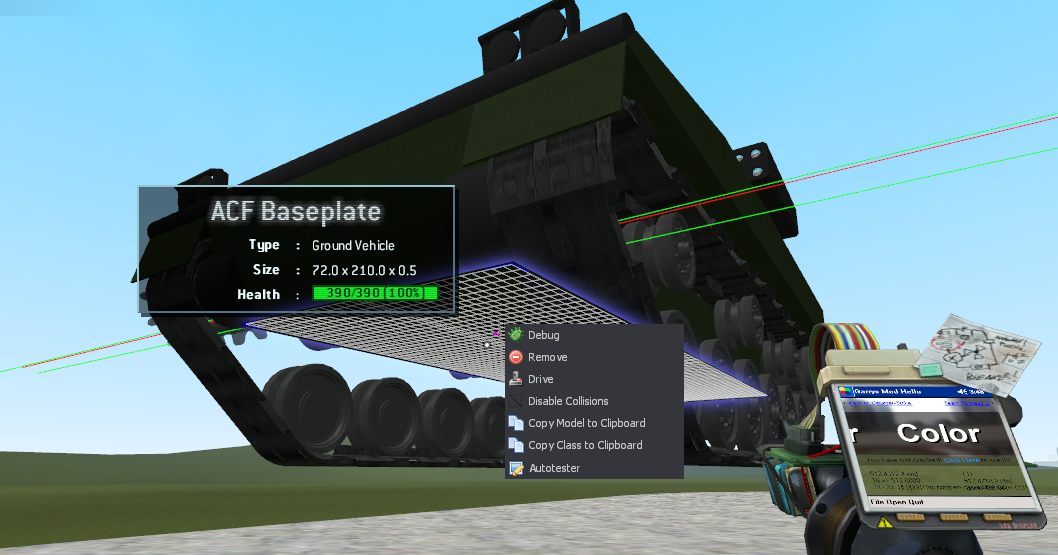
This opens up the menu below:
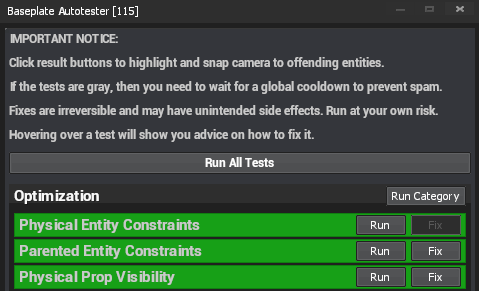
Click the “Run” or “Run Category” options to run the tests.
Some options have a “Fix” button available, which will attempt to fix the issue. Run at your own risk.
Dupe pack submission tool
Last Modified: 23-May-26Nothing you submit leaves your browser. Save your progress elsewhere.
Fill in the information as instructed. To submit either:
- Make a PR with a similar structure to the other dupes
- Submit in the
community-resourceschannel with this zip.